
CompleteFTP MCP Server: Configure MFT with AI Agents
Every MFT vendor has an AI roadmap. Ours is a feature you can install today.
CompleteFTP ships with a native MCP server. Claude Code, OpenAI Codex, and any MCP-compatible agent can configure the server through the Model Context Protocol, with a read-only mode for safe inspection. Diagnostic-log access is on the roadmap. We believe this is the first MFT server with native MCP support.
Download the 30-day trial. No credit card, no sales call.
What MCP lets your agents do
Three concrete capabilities shipping today. One on the way that will change how teams troubleshoot.
Configure the server
Add users, set permissions, define automations, change settings. The server exposes 120 configuration tools mapped one-to-one to the CompleteFTP admin CLI, plus documentation lookup. Anything an admin can do at the shell, an agent can do through MCP. Every change is recorded in CompleteFTP's configuration-change log with before/after values.
Run in read-only mode
Launch the MCP server with --read-only and every mutating tool is removed from its registry before it starts serving. The agent physically cannot call anything that modifies configuration, because the tools aren't there to be called. Binary switch (not scoped to sub-areas). Useful when you want the assistance without taking on the risk of an accidental change.
Walk you through the Manager UI
Because the agent can look up the CompleteFTP guide directly, it can also walk you through the Manager UI for changes you'd rather make by hand. The agent doesn't have to do the work to be useful. Sometimes the right job is "tell me which screen to click."
On the roadmap: diagnostic-log access
The one we're most excited about. Most production MFT incidents are diagnosed by reading log files. When an agent can pull, parse, and explain those logs, troubleshooting sessions stop starting with "let me find the right log file." Not shipping today; we'll announce it when it lands.
Works with Claude Code, OpenAI Codex, and any MCP-compatible agent. Ships in all CompleteFTP editions (including Free) from version 26.1.0 onwards.
How it works
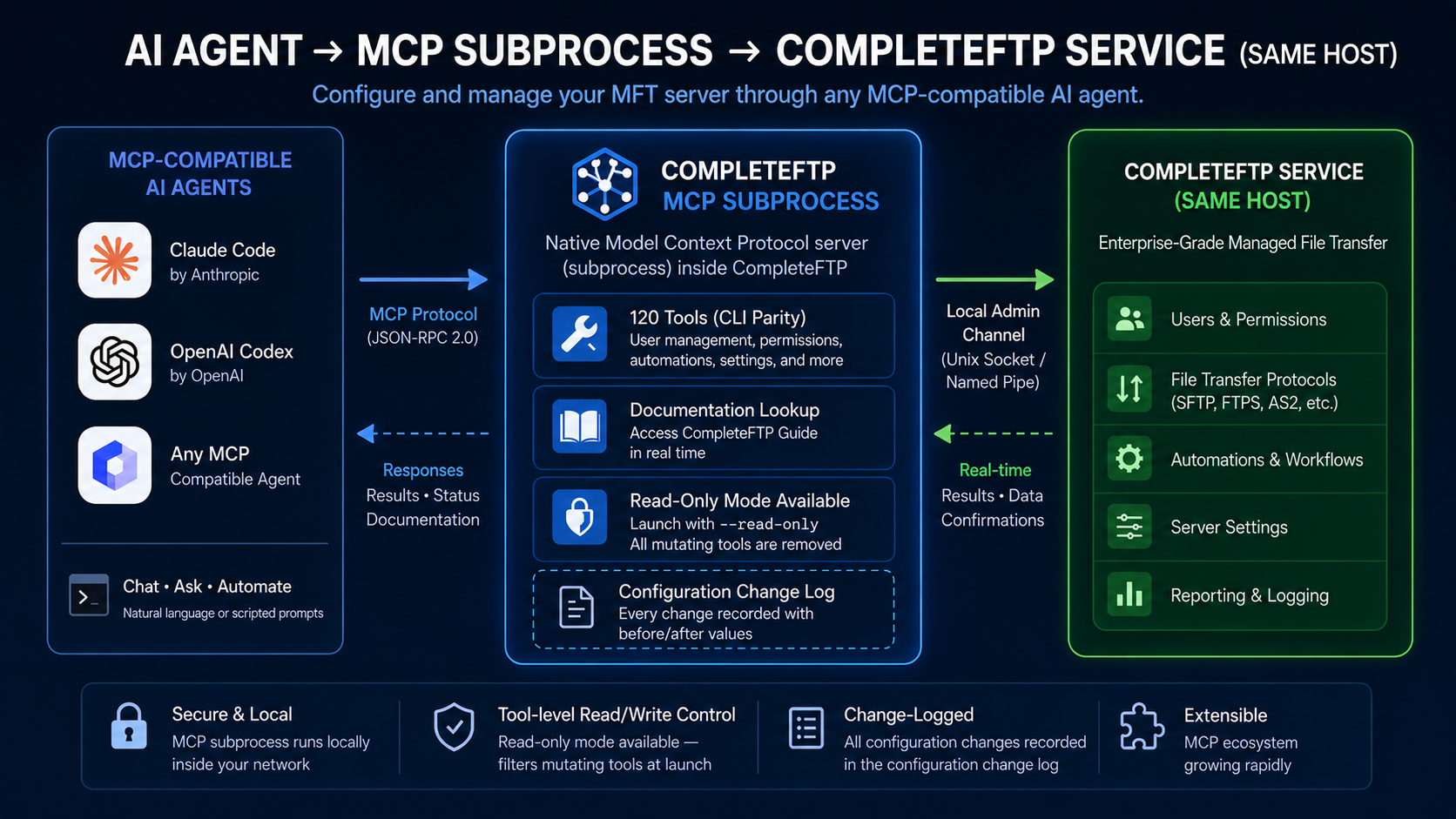
The MCP subprocess exposes 120 tools mapped one-to-one to the CompleteFTP admin CLI, plus documentation lookup. A typical exchange looks like this:
You: "Add a user called finance-drop with write access to /finance/uploads/ and email me when they upload something over 100 MB."
Agent: Calls user_add finance-drop, folder_chmod for the target folder, notification_add for the upload threshold; returns a summary of the three changes plus the resulting configuration-change-log lines.
Read-only mode is the same conversation with the mutating tools filtered out at launch. The agent explains the current setup, drafts what it would do, but can't apply anything.
Security and audit
Local IPC only. No network port. The MCP server is a subprocess your agent launches on the CompleteFTP host. It talks to the running service through a local admin channel (a Unix domain socket on Linux, a named pipe on Windows). Nothing crosses the network. There's no MCP TCP port to firewall.
Access is equivalent to local admin on the host. Because the connection is local, the security boundary is OS-level access to the machine itself. On Windows the agent must run elevated, and the admin channel is enabled with a small one-time service-config flag (--enable-admin-cli), with GUI-based enablement planned for a future release. On Linux, filesystem permissions on the socket path apply.
Configuration-change log records every change with before/after values. MCP-driven changes appear in the same log as CLI or Manager UI changes, timestamped, with the full row-level diff. CompleteFTP does not currently distinguish agent-driven changes from human-driven ones in that log. If strict agent-vs-human attribution matters to your compliance posture, run the agent in read-only mode. As a safety net, the service also keeps 15 rolling daily backups of the whole configuration for out-of-band restore.
Data leaves the host only through the agent's model provider. CompleteFTP itself makes no outbound calls; what the agent chooses to send to its model (user names, folder paths, licence keys) is a client-side decision. For data-residency-sensitive shops, pair read-only mode with a model endpoint you trust (a self-hosted model, or an enterprise Claude/OpenAI plan with data controls).
What this page isn't claiming
A few things this page isn't claiming, just so we're straight.
CompleteFTP isn't an "AI-powered" product. It's a secure file-transfer server. Fast, audited, AD-aware. The MCP integration lets external agents drive it. The server itself is what you'd expect.
The MCP server isn't a chatbot. There's no conversational interface bolted on. It's a protocol-level integration. Agents talk to the server programmatically. Humans still use the admin UI when they want to.
"World's first" isn't a flat claim, it's a "we believe." The category has had eighteen months to ship something equivalent. As far as our search shows, nobody has. If you find a peer offering, tell us and we'll update the page.
We come to this from AI research
Most "AI in MFT" today is chatbots and admin copilots. We saw a way to build something more structurally useful.
Our team's original academic work was in neural networks and adaptive fuzzy logic, the research family that seeded today's AI, well before that combination of ideas had a name in industry. Twenty-five years later, applying that thinking to the mission-critical problem of moving files securely, the MCP server is what the combination produces.
What runs on this today
CompleteFTP runs in production at thousands of organizations worldwide. NASA, Boeing, Audi, 3 Italia, Global Payments, TeliaSonera. Twenty-five years of continuous development by the same engineering team.
"CompleteFTP has worked for years without any issue whatsoever. CompleteFTP is absolutely mission critical for what we do. It just works." Malcom Moody, Sky News Australia
Per-server perpetual license. Unlimited users at every tier. No annual subscription that compounds.
Internally, our support team uses an agent-grounded system: every incoming ticket is matched against about 10,000 prior tickets via embedding vectors, then grounded in the source code and help text. A human engineer still writes the reply. The context is now exhaustive.
Install and connect
On Linux the admin channel is on by default. On Windows, enable it once (sc config CompleteFTP binpath= "... --enable-admin-cli", then stop and start the service). Then point your agent at the completeftp mcp subcommand.
Claude Code (.mcp.json):
{
  "mcpServers": {
    "completeftp": {
      "command": "C:\\Program Files\\Complete FTP\\Server\\completeftp.exe",
      "args": ["mcp", "--read-only"]
    }
  }
}
OpenAI Codex (~/.codex/config.toml):
[mcp_servers.completeftp]
command = "C:\\Program Files\\Complete FTP\\Server\\completeftp.exe"
args = ["mcp", "--read-only"]
Or via the Claude Code CLI:
claude mcp add completeftp -- "C:\Program Files\Complete FTP\Server\completeftp.exe" mcp --read-onlyDrop --read-only and restart the agent when you're ready to let it make changes.
Try it
The trial is the pitch. Download the 30-day trial, which includes the full feature set of every edition, or use the Free edition indefinitely; the MCP server is in both. Install it, connect Claude Code or OpenAI Codex, configure a user via your agent, or run it in read-only mode and just ask it to explain your setup. Watch it work.
Then decide.
- Download the 30-day trial: no credit card, no sales call
- Compare editions: per-server perpetual, unlimited users
- Contact engineering: only if you want to
Frequently asked questions
What is the Model Context Protocol (MCP)?
MCP is an open protocol introduced by Anthropic in late 2024 for connecting AI agents to external tools and data sources. An MCP server exposes a set of capabilities that any MCP-compatible agent, such as Claude Code or OpenAI Codex, can invoke directly. It's the standard the industry has converged on for agent-to-system integration.
What can an AI agent do with the CompleteFTP MCP server?
Three things, today: configure the server (add users, set permissions, define automations, change settings) via 120 CLI-parity tools plus documentation lookup; run in read-only mode, where every mutating tool is filtered out at launch; and, because the agent can read the CompleteFTP guide directly, walk you through the Manager UI when you'd rather make the change by hand. Diagnostic-log access is on the roadmap.
Is the MCP server read-only or can it make changes?
Both modes are available. Launch the MCP server with --read-only and every mutating tool is removed from its registry before it starts serving. The agent physically cannot call them. It's a binary switch, not per-area scoping. Full read-write mode is available without the flag; every configuration change is recorded in CompleteFTP's configuration-change log with before/after values, alongside changes made through the CLI or Manager UI.
Which agents work with CompleteFTP MCP?
Any MCP-compatible agent. That includes Claude Code, OpenAI Codex, and any other client that implements the Model Context Protocol. The protocol is the contract; the choice of agent is yours.
Which CompleteFTP edition includes the MCP server?
The MCP server ships in all CompleteFTP editions from version 26.1.0 onwards, including the Free edition. Standard, Professional, and Enterprise MFT editions include it alongside their additional capabilities. The 30-day trial includes the full feature set.
Is CompleteFTP an AI product?
No. CompleteFTP is a secure file-transfer server with strong MFT capabilities. The MCP server is an integration that lets external AI agents drive the server programmatically. The server itself does what a production-grade SFTP/FTPS/MFT server does, audited and AD-aware, with the same operational maturity it has had for 25 years.
Related reading
- CompleteFTP product overview: editions, features, and pricing
- MFT vs SFTP guide: protocol vs platform, and when each one fits
- SFTP server for Windows: buyer's guide to choosing an SFTP server
Other technical articles
- CompleteFTP MCP Server: Configure MFT with AI Agents
- Connecting to Your SFTP Server with FileZilla and WinSCP: A Step-by-Step Guide
- FTPS vs SFTP
- Free SFTP Server for Windows: What's Actually Free (and What's Worth Paying For)
- Hardening SSH/TLS Ciphers to Pass a Pen Test (2026)
- High Availability SFTP: Active-Active Clustering on Windows
- How SSL,TLS and SSH work
- How secure is SFTP?
- How to Set Up an Enterprise-Grade SFTP Server on Windows (Beyond OpenSSH)
- How to Set Up an SFTP Server to Receive Files From External Partners
- Key Differences Between MFT and SFTP
- Migrating Your File Transfer Server to a New Machine (Without Losing Your License)
- SFTP Audit Logs for Compliance: What Auditors Actually Want
- SFTP Automation: The Two Approaches and When to Use Each (2026)
- SFTP Encryption at Rest: How It Works and How to Enable It
- SFTP Server for Windows: How to Choose the Right One (2026)
- SFTP Server with Active Directory: 2026 Setup Guide
- SFTP and FTPS Ports Explained: 22, 21, 990 and the Passive Range That Breaks Firewalls
- Self-Hosted SFTP with S3, Azure, SharePoint or Google Cloud Storage Backend
- What is FTP?
- What is FTPS?
- What is Managed File Transfer (MFT)?