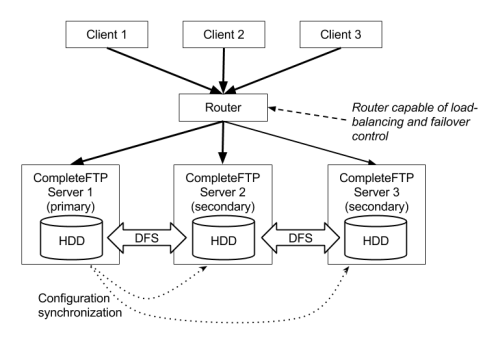
Clustering in CompleteFTP refers to the ability to run multiple instances of CompleteFTP servers across different machines, working together to provide a unified service. This setup allows for load balancing, failover, and centralized administration capabilities, ensuring that client connections are distributed across servers and that the service remains available even if one server fails. While CompleteFTP does not provide native clustering, when combined with a hardware or software load balancer (e.g., Microsoft NLB), load balancing and failover can be achieved.
Benefits of Clustering:
CompleteFTP's Role in Clustering:
CompleteFTP clustering can be configured using different architectures depending on your organization's needs. Below are the main options.
In this architecture, each server has its own local storage. File synchronization is managed externally through tools like Windows DFS, which replicates files and directories across all servers in near real-time. This ensures that users can access their files regardless of which server they connect to.
Architecture Diagram:
Explanation:
Pros: This architecture offers redundancy and ensures that user files are available across all servers.
Cons: There is added complexity due to the external file synchronization solution.
In this architecture, all servers in the cluster access a shared network storage system, such as NAS or SAN, eliminating the need for file synchronization. This simplifies file management as all servers access the same centralized storage for user files.
Architecture Diagram:
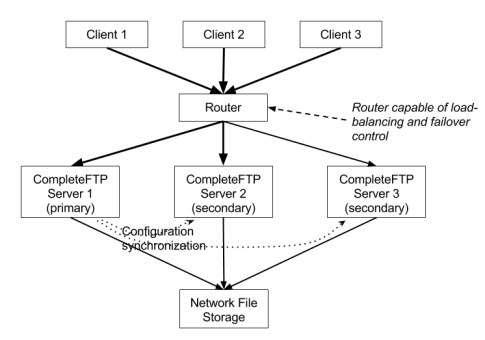
Explanation:
Pros: Simplifies file management by removing the need for complex file synchronization tools.
Cons: The shared storage system can become a single point of failure unless it has built-in redundancy.
In high-load environments, it may be necessary to reduce the load on the primary server. In this architecture, the load balancer directs most client traffic to secondary servers, allowing the primary server to focus on configuration management and synchronization tasks.
Architecture Diagram:

Explanation:
Pros: Improves performance by offloading client traffic from the primary server.
Cons: More complex load balancer configuration is required.
Primary Server: The primary server is the central point for configuration management within the CompleteFTP cluster. All configuration changes are made through the CompleteFTP Manager on the primary server. It is responsible for synchronizing these changes to all secondary servers in near-real-time. The primary server also acts as the point of contact for new secondary servers joining the cluster, ensuring they are updated with the latest configurations.
Secondary Servers: Secondary servers handle client connections and apply the configuration changes received from the primary server. Although secondary servers are capable of handling client traffic, they depend on the primary server for all configuration updates.
In some architectures, to reduce the load on the primary server, most client traffic can be directed to secondary servers while the primary focuses on administrative tasks. This architecture still ensures that the primary retains control over all configuration synchronization.
Load balancers are critical in clustering setups as they distribute incoming client connections across the servers in the cluster, managing traffic and providing failover. They help ensure that no single server becomes overloaded and that the cluster remains available even if a server fails.
Role: The load balancer can be configured to manage traffic distribution and failover, redirecting client connections to operational servers if a server goes down. In scenarios where HTTP/S protocols are in use, load balancers should be configured for session stickiness to ensure that client sessions remain with the same server.
Types: Hardware load balancers or software solutions such as Microsoft Network Load Balancing (NLB) can be used to manage traffic across a CompleteFTP cluster.
Some protocols require specific configurations in a clustered environment. CompleteFTP supports multiple protocols, and different strategies must be applied for high availability and failover based on the protocol.
CompleteFTP supports HTTP and HTTPS file transfers, but each HTTP/S session is local to the specific server a client connects to. The load balancer must ensure that all requests from a client during a session are directed to the same server. This can be achieved by configuring session stickiness, typically using the client's IP address or cookies. A future release of CompleteFTP may include HTTP/S session cache replication across the cluster.
For FTP, SFTP, and FTPS, all requests happen within a single connection. Once a connection is established, it remains on the same server for the duration of the session. Load balancing is applied only at the connection level, ensuring that new connections are distributed evenly across servers. While secondary servers handle client connections, all servers must remain synchronized with the primary server for configuration data to ensure a seamless experience across sessions.
Before setting up clustering in CompleteFTP, it is important to understand the prerequisites and requirements to ensure a successful deployment.
Licensing: Clustering is available in the CompleteFTP Enterprise MFT edition. Ensure that you have the appropriate license to use clustering features.
Supported Protocols: Clustering supports all protocols available in CompleteFTP, including SFTP, FTPS, FTP, and HTTPS.
System Requirements:
Network Considerations:
Version Compatibility: All servers in the cluster must be running the same version of CompleteFTP. Ensure that all installations are up to date and consistent to avoid synchronization issues.